
A school visitor system should answer operational questions: Why is this person here? Who is responsible for the visit? What verification and approval occurred? Are they currently on site? Was the visit closed correctly?
It should not become a database of personal information collected without a clear need.
Track the visit lifecycle
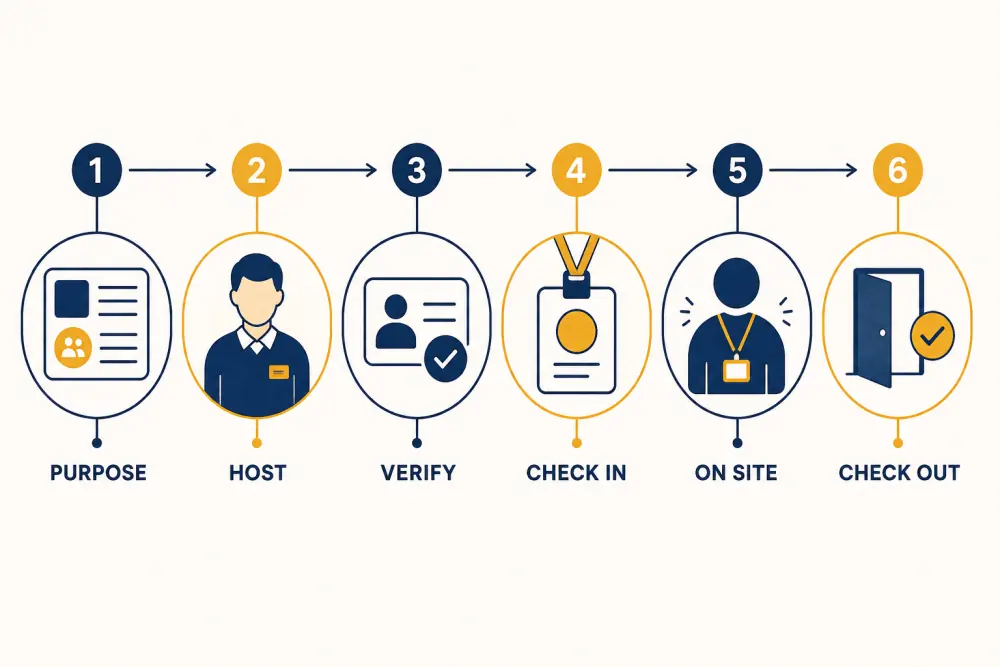
The core record can follow six stages: purpose, host, verification, check-in, on-site status, and checkout. Each stage supports a decision, and each field should have an owner and retention reason.
Purpose and visitor type
Use a controlled list that is broad enough for operations without revealing sensitive details at reception. Parent meeting, delivery, maintenance, interview, event, and official visit may need different approval and access paths.
Free text can support an exceptional case, but it should not become the only way to classify visits.
Host and approval
Record the staff member, department, or event responsible for the visitor and the required approval state. Pre-registration can reduce queues, but arrival still needs verification according to school policy.
Keep declined or cancelled visits distinct from checked-in visits. Staff should know what to do when the host cannot be reached rather than allowing a queue to pressure an informal decision.
Proportionate verification
Define how identity or authority is checked for each visitor type. A contractor, guardian collecting a child, invited speaker, and parcel delivery do not necessarily need the same fields. Requirements should follow school policy, risk assessment, and applicable law.
Where an identity document is checked, consider whether recording the document type is enough. Storing full numbers or images creates additional sensitivity and security obligations.
Check-in details
Useful fields may include arrival time, entry point, issued pass, accompanying person where required, and approved destination or access zone. Make the current state visible to reception and security roles without exposing the record to unrelated staff.
Avoid typing information already supplied in an approved pre-registration. Confirm and update it instead.
On-site state
The system should distinguish expected, awaiting approval, checked in, on site, overdue, checked out, and cancelled where those states fit policy. An authorised view of current visitors is more operationally useful than a large historical report.
Define escalation for an expired visit, lost pass, uncontactable host, or visitor outside the expected area. Software surfaces the exception; trained people decide the response.
Checkout and closure
Record departure time, pass return where relevant, and the role closing the visit. Do not automatically close every visit at the end of the day without first exposing unresolved cases for review.
For emergency accountability, document how visitor information is accessed if normal devices or networks are unavailable.
Retention, access, and audit
Set retention periods according to documented institutional and legal requirements. Limit historical search, exports, and reports to authorised roles. Record administrative changes and regularly remove access from staff who no longer need it.
The school should review the vendor’s security approach, data export options, deletion process, backups, and incident response. A configuration should never be described as automatically compliant without reviewing local obligations.
Keep notes disciplined
Free-text notes can become a place for opinion, unnecessary personal information, or sensitive incident details. Provide specific structured states where possible and reserve confidential incident records for the approved process and roles.
Train staff to write factual, necessary information.
Visitor-data checklist
- Every collected field has a purpose and owner.
- Visitor types lead to proportionate approval paths.
- Host and approval status are visible at entry.
- Verification avoids unnecessary document storage.
- Current on-site and overdue states are clear.
- Checkout and unresolved visits have follow-up.
- Historical search and exports are role-restricted.
- Retention and deletion follow documented policy.
- Free text is limited and factual.
- Outage and emergency access procedures are tested.
Scholva’s visitor management capabilities can connect approvals, gate passes, current status, and audit history within role-based access. Request a demonstration using your visitor categories and exception cases.
Related reading: Paper registers vs digital gate passes and School data-security checklist for vendors.