
School HR operations affect the classroom every day. A leave approval may create a substitution need; incomplete attendance may delay payroll preparation; a role change should update access as well as the staff file. When each process sits in a separate spreadsheet, staff repeat work and exceptions arrive late.
The right design connects the workflows while preserving clear ownership and confidentiality.
Start with one staff record
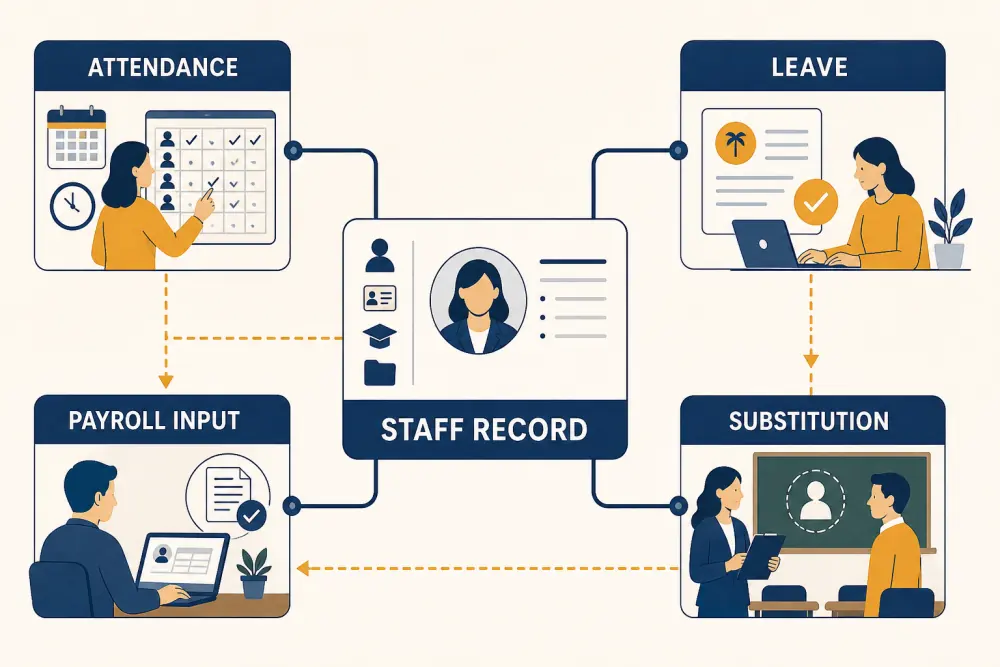
Maintain a current staff identity with employment status, role, department, campus, reporting line, authorised contact details, joining or exit dates, and documents required by institutional policy. Attendance, leave, substitutions, and payroll inputs should refer to this record rather than create separate versions of the person.
Restrict sensitive fields. Academic coordinators may need availability and subject capability; they do not need bank or salary information.
Define staff attendance policy
Document working patterns for teachers, administrators, part-time staff, visiting faculty, and other roles. Decide how the institution handles late arrival, authorised duty outside campus, missed punches, remote work where applicable, and corrections.
Provide a simple exception route. A biometric or device record is evidence, not complete context. Authorised staff should review anomalies before they become payroll inputs.
Connect leave approval to operations
A leave request should show type, dates, balance or eligibility according to policy, approver, and status. The system can prevent date errors and route approval, but the institution remains responsible for its policies and applicable requirements.
When approved leave affects teaching, create a visible substitution need for the academic coordinator. Avoid exposing the confidential leave reason; the coordinator normally needs dates, timetable impact, and required capability.
Manage substitutions separately
A substitute assignment is an academic decision, not merely an HR status. Check subject capability, timetable conflicts, workload, room or duty requirements, and whether learners need an update.
Record temporary assignments without changing the master teacher allocation. At the end of the day or period, unresolved classes should remain visible for review.
Prepare verified payroll inputs
HR software can compile approved attendance, leave, authorised adjustments, allowances, or other inputs defined by the institution. It should not silently decide payroll policy. Create a review and sign-off before information is handed to payroll processing.
Keep source periods locked after approval, with a controlled correction path. Re-running a report should reproduce the approved input set or clearly identify later changes.
The school HR workflow should support preparation and auditability, while the school confirms tax, labour, pension, and payroll treatment with qualified advisers and current local requirements.
Coordinate onboarding and exit
Onboarding should assign the correct role, campus, timetable or department access, and training. Avoid copying permissions from an existing employee without reviewing them.
An exit process should record the effective date, remove system access, transfer responsibilities, recover assets, and retain records according to policy. Connect it with role-based security controls so inactive accounts do not remain open.
Give each team the right view
Employees need their own attendance, requests, approvals, and schedules. Managers need team exceptions. Academic coordinators need substitution requirements. Payroll roles need approved inputs. Senior leaders need aggregate staffing trends without unnecessary personal detail.
Designing these views reduces spreadsheet exports and protects confidentiality.
Track operational measures
Review unresolved attendance exceptions, leave approval time, classes awaiting substitutes, repeated substitution load, payroll changes after sign-off, and accounts awaiting deactivation. Use trends to improve staffing and workflow, not to rank people without context.
School HR checklist
- One current staff record supports connected workflows.
- Role-based access separates operational and sensitive fields.
- Attendance states and correction rights are defined.
- Leave follows policy and visible approval.
- Approved teaching leave creates a substitution need.
- Substitute assignment checks capability and conflicts.
- Payroll inputs are reviewed and signed off.
- Post-approval corrections retain history.
- Onboarding and exit include system access and asset steps.
- Statutory treatment is reviewed by qualified people.
Connected school HR reduces handoffs without merging responsibilities that should remain separate. Scholva can bring staff attendance, leave, substitutions, and approved payroll inputs into one controlled operational view. Request a demonstration using your current approval path.
Related reading: How to build a conflict-free school timetable and Role-based access protects school data.
For a related perspective, see One Academic View: Bringing Admissions, Attendance, Fees, Exams, Transport, and Communication Together.