
Informal group chats are convenient because families already know how to use them. They can also become difficult to govern as a school grows. Messages get buried, phone numbers are exposed, staff respond from personal accounts, and nobody can easily confirm which audience received an important notice.
A dedicated school communication platform does not need to replace every human conversation. Its value is giving official communication a clear, accountable home.
The difference is structure
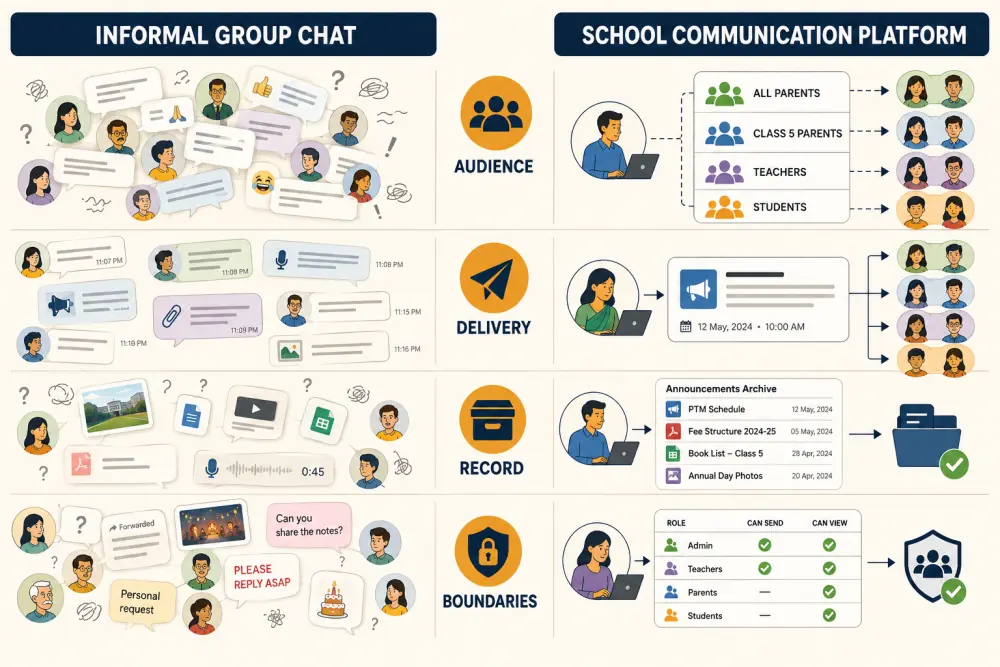
The two approaches differ in four important ways.
Audience: A group chat depends on manually maintained membership. A school platform can target a campus, class, section, route, activity, or individual family using current school records.
Delivery: In a busy chat, an official notice competes with replies and unrelated discussion. A structured channel can distinguish announcements, reminders, alerts, and messages that require acknowledgement.
Record: Important information in a chat is difficult to find later and may disappear when staff change phones or roles. A managed platform can retain an authorised institutional record.
Boundaries: Personal groups blur working hours and expose numbers. Official accounts and role-based access help the school define who may send, reply, or view each kind of message.
Decide what belongs in the official channel
Create a simple communication policy. Attendance alerts, fee notices, timetable changes, examination information, transport updates, emergency notices, and school-wide announcements should normally use an official channel.
Some conversations still need a call or meeting, especially sensitive discussions about learning, behaviour, wellbeing, or financial circumstances. The platform should support those interactions with context, not turn every situation into a broadcast.
Target messages from reliable records
Communication quality depends on data quality. If class, guardian, and route records are current, staff can select an audience without rebuilding lists. When a student changes section or bus route, future messages should follow the updated record automatically.
This is why communication works better when connected to academic operations, transport, and parent access, rather than operating as an isolated bulk-messaging tool.
Reduce noise with message types
Not every update deserves the same urgency. Define a small set of message types:
- Announcements for information that does not require a response.
- Reminders tied to a date or action.
- Alerts for time-sensitive operational changes.
- Acknowledgements when the school must confirm receipt.
- Individual messages for a specific student or family.
Use urgency sparingly. If every message is marked important, families stop recognising the ones that genuinely need immediate attention.
Protect privacy and staff wellbeing
Review who can see guardian contact information, create large audiences, download recipient lists, and send outside normal hours. Remove access when an employee changes responsibilities or leaves.
Set response expectations for families and staff. An official channel should make communication clearer, not create an assumption that teachers are available around the clock. Publish contact routes for emergencies and define which non-urgent messages will receive a response on the next working day.
Plan the transition from existing groups
Do not open a new platform while leaving every old group active indefinitely. Choose a transition date, explain which messages will move, help families activate access, and provide a support route for login or contact-detail problems.
For a short period, old groups can carry reminders that official updates have moved. After adoption is stable, close or clearly label unofficial channels so families are not forced to monitor both.
Measure communication quality
Useful indicators include successful delivery, acknowledgements where required, outdated contacts, repeated parent questions, staff time spent recreating lists, and urgent corrections after sending. Message volume alone is not a success metric.
Ask families whether they can find important notices later and understand which channel is authoritative. Ask staff whether they can communicate without using personal numbers or copying lists between tools.
A practical decision checklist
- Can staff target audiences from current school records?
- Are sender permissions role-based?
- Can important notices be found later?
- Are delivery problems visible to authorised staff?
- Can families manage more than one child without duplicate confusion?
- Are personal phone numbers protected?
- Are emergency and routine communication clearly separated?
- Is there a defined process when a message needs a human follow-up?
The best school communication system is not the one that sends the most messages. It is the one that helps each family receive relevant information through a channel they can trust. To compare the workflow with your present groups, request a Scholva demonstration.
Related reading: What parents need from a school parent portal and Parent self-service reduces school office calls.