
A connected school platform brings useful information together. It should not make every record visible to every employee. Teachers, accountants, principals, parents, transport teams, and reception staff need different actions and data scopes.
Role-based access control helps the institution translate those responsibilities into repeatable permissions.
Give roles only the access they need
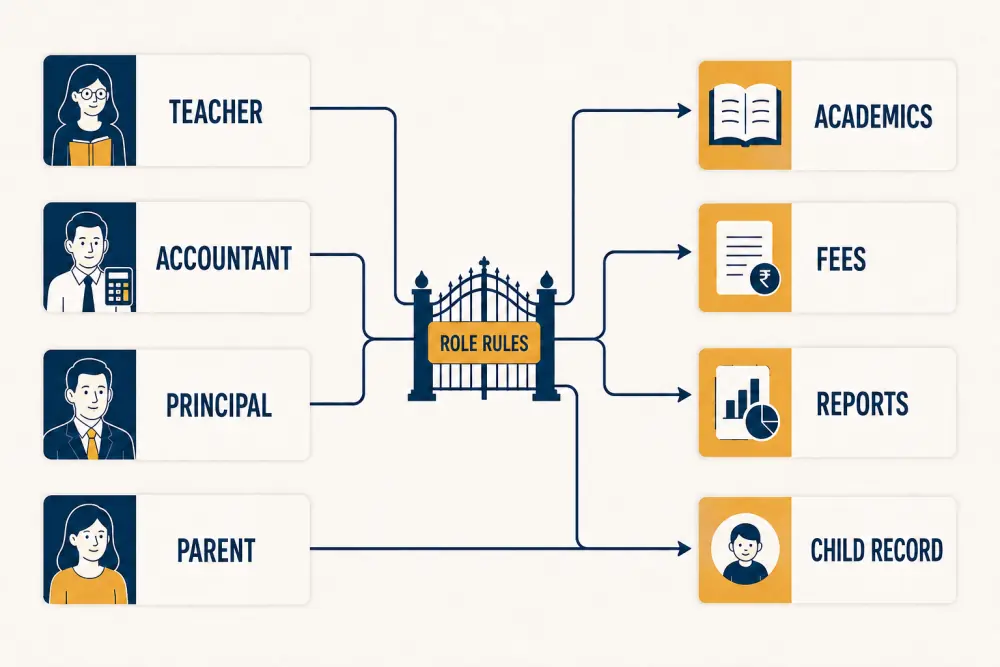
The diagram shows examples, not universal policy. A teacher may need academic records for assigned classes, an accountant may need fee operations, a principal may need broader reports, and a parent should only access authorised children. Each institution must define its own roles and exceptions.
Use least privilege: start with the minimum actions and scope required for the job, then add justified access. Convenience alone is not a sufficient reason for broad permissions.
Separate action from scope
Permissions should answer both what a person can do and where they can do it. “View attendance” may be limited to assigned classes, a grade, one campus, or the whole institution. “Manage fees” may allow recording payments but not changing fee structures or approving refunds.
This distinction prevents a simple job title from becoming an all-or-nothing security decision.
Design roles around responsibilities
Interview people who perform the work and their managers. List frequent tasks, sensitive exceptions, approvals, and information that is not required. Create reusable roles for common responsibilities rather than granting permissions individually to every user.
Avoid creating a powerful custom role whenever someone encounters a temporary problem. Fix incorrect workflow configuration or use a time-bound exception where appropriate.
Separate important duties
Some actions benefit from more than one role. The person who creates a fee concession may not be the person who approves it. A staff member entering marks may require academic approval before publication. An administrator requesting elevated access should not approve their own request.
Separation reduces error and misuse, but it should match the institution’s size. Smaller schools can use review reports and owner oversight where two separate staff members are not available.
Handle joiners, movers, and leavers
Access should follow effective employment or enrolment dates. Onboarding assigns approved roles; job changes remove old responsibilities before adding new ones; exit disables sign-in and active sessions promptly.
Guardian and student relationships also change. Review withdrawals, alumni status, custody updates, siblings, and multiple guardians so portal access remains accurate.
Connect staff HR records and student records to access review without automatically granting sensitive permissions from a single field.
Control privileged access
System administrators and other elevated roles can make wide changes. Keep their number small, require stronger authentication where available, and avoid using privileged accounts for everyday work. Record important configuration, permission, export, and impersonation actions.
Temporary vendor or support access should have approval, purpose, scope, expiry, and review.
Review regularly
At least at meaningful organisational changes - and on a regular schedule - ask managers and data owners to confirm who has sensitive roles. Look for inactive accounts, conflicting roles, access across former campuses, broad exports, and exceptions that never expired.
An access review should result in recorded decisions, not only a downloaded list.
Make access visible to users
Clear interfaces reduce accidental misuse. People should see the modules and students relevant to their role, with sensitive actions distinguished from normal tasks. When access is denied, give a safe explanation and a formal request route rather than encouraging credential sharing.
Scholva’s security model should be evaluated alongside school policy, staff training, device controls, and vendor practices. Role-based access reduces risk; it does not guarantee security by itself.
RBAC checklist
- Roles are based on documented responsibilities.
- Permissions include both action and data scope.
- Least privilege is the default.
- High-impact actions use approval or review.
- Individual exceptions have reasons and expiry.
- Joiners, movers, leavers, and guardian changes update access.
- Privileged accounts are few and monitored.
- Important access and configuration actions are auditable.
- Managers and data owners review access regularly.
- Users have a formal route to request changes.
Well-designed access control helps connected data remain useful without becoming unnecessarily exposed. To walk through Scholva roles using your institution’s responsibilities, request a demonstration.
Related reading: School data-security checklist for software vendors and What schools should track in visitor management.