
Parents often call the school office for a simple reason: the information they need is difficult to find, out of date, or split across messages and systems. A useful self-service portal removes that friction while keeping a clear route to a person when the situation is sensitive or unusual.
The goal is not to prevent calls. It is to answer routine questions reliably so staff have more time for the conversations that need judgement and care.
Put common needs in one place
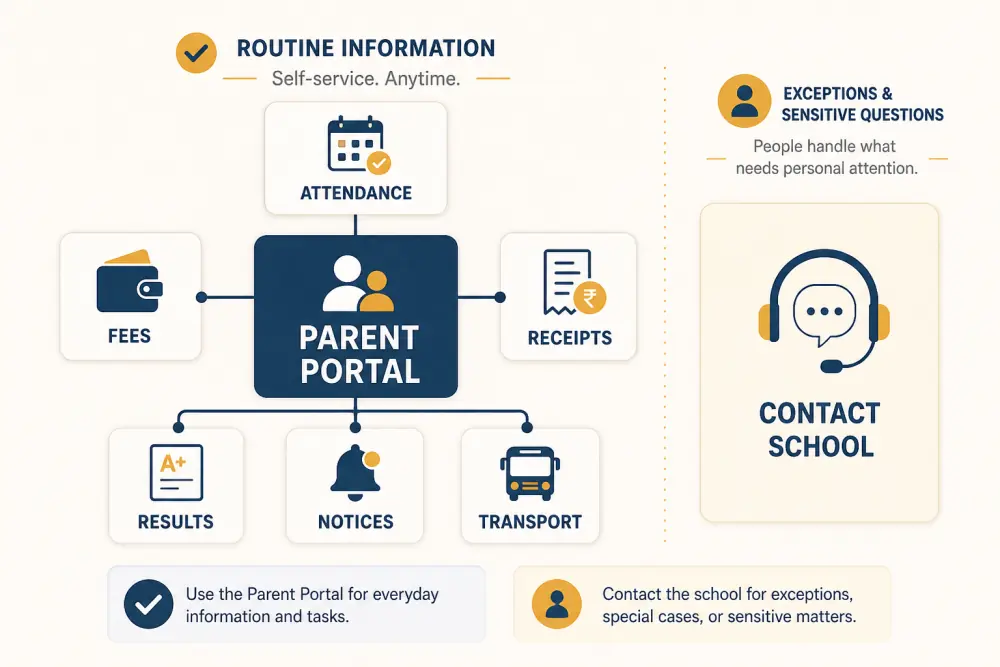
Prioritise the information families repeatedly request: current attendance, fee balance and due dates, payment receipts, published results, notices, calendar items, transport status, forms, and authorised child details. Each item should come from the responsible school workflow rather than a manually copied portal page.
Learn why families contact the office
Review call notes, reception questions, email subjects, and parent feedback for several weeks. Group them by reason and identify which are high-volume, time-sensitive, or stressful. Check patterns around admissions, fee deadlines, examinations, report publication, holidays, and transport changes.
Do not assume every frequent call should become self-service. Questions about safeguarding, individual learning needs, disputed fees, custody, complex admissions, or wellbeing require a safe human route.
Make information trustworthy
Show the effective date or latest update where timing matters. A transport status with no timestamp or a fee balance that excludes yesterday’s payment can create more calls than it prevents.
Assign an owner to each data source and define expected update time. Handle failed integrations visibly; do not present stale information as current. The automatic payment-reconciliation workflow illustrates why matching and exception handling matter before a receipt appears.
Design for the phone parents already use
Use short labels, readable text, large touch targets, and a clear first screen. Important tasks should not require navigating a desktop-style menu. Keep page weight low for slower connections and avoid making families download a PDF for information that can be displayed accessibly.
Support the languages and formats the school can maintain accurately. Use plain wording and explain school-specific terms. Dates, currency, and names must follow the institution’s context.
Notifications should link to the relevant item after sign-in, not merely say “check the portal.” Let parents control non-essential channels and frequency while preserving required service communications according to policy.
Get identity and family relationships right
Self-service may expose sensitive information, so account setup and recovery need more than convenience. Verify the guardian relationship, support more than one authorised guardian, and handle siblings, withdrawals, and custody restrictions carefully.
Never let one parent’s profile changes silently overwrite another authorised contact. Define which personal details can be proposed online and which changes require staff review.
Use scoped access so guardians see only authorised children and appropriate records. Review the wider principles in what parents need from a school portal and role-based access.
Preserve human support
Every important page should provide a relevant contact or request route. Ask for enough context to route the issue, but do not force parents through an inflexible form when they need urgent help.
Publish expected response times and distinguish routine, urgent, and emergency channels. A confirmation number and visible request status prevent repeated calls. Staff should see the information the parent was viewing so the family does not have to explain everything again.
Offer assisted digital support at the office and an alternative for families without suitable devices, connectivity, literacy, or accessibility tools. Self-service must not become service denial.
Roll out by question, not by module
Choose two or three common questions such as “Was my payment received?”, “When is the next fee due?”, or “Has the bus route changed?” Make the answer reliable end to end. Test with parents who use different devices, languages, and levels of digital confidence.
Then expand based on evidence. A portal with ten dependable answers is more valuable than one with fifty uncertain screens.
Measure the experience
Track contact reasons, repeat contacts, unresolved requests, portal task completion, failed sign-ins, account-recovery demand, data freshness, accessibility issues, and parent satisfaction. A fall in calls is positive only if families still receive the help they need.
Review exceptions with office staff. Their experience often reveals unclear wording, missing status information, or processes that still require duplicate entry.
Self-service checklist
- Rank parent questions by volume, urgency, and suitability.
- Connect each answer to an accountable source workflow.
- Display freshness and handle unavailable data honestly.
- Design for mobile, accessibility, language, and low bandwidth.
- Verify guardians and maintain accurate family relationships.
- Provide secure, practical account recovery.
- Keep a visible human route for exceptions.
- Measure resolution and inclusion, not call reduction alone.
Scholva’s parent portal can bring routine school information into one secure experience. Request a demonstration to map it to your office workload and family needs.
Related reading: School communication apps versus WhatsApp groups and Improving fee collection without chasing parents.