
Online assessment does not remove teachers from evaluation. Used well, it removes repetitive scoring, result compilation, and copying so teachers can spend more time reviewing misconceptions and giving useful feedback.
The greatest savings come from designing the assessment workflow - not simply moving the same paper onto a screen.
Decide what should be automated
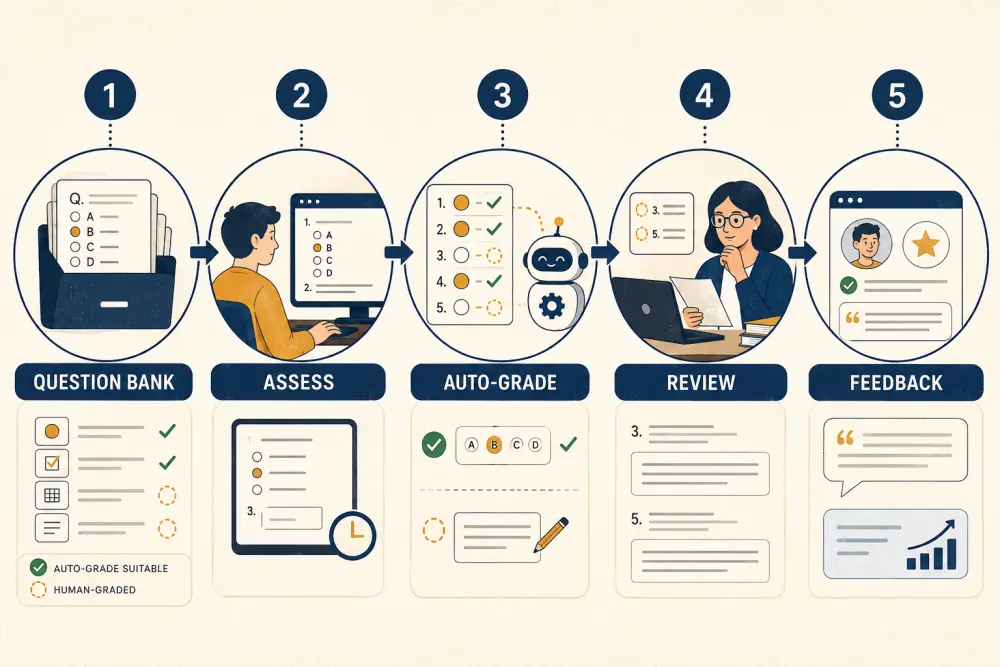
Objective items with an unambiguous answer - such as carefully written multiple choice, matching, or numeric responses with defined tolerance - can often be scored automatically. Essays, working steps, creative responses, oral work, and many practical tasks need human judgement.
A balanced assessment may combine both. Let the system score appropriate items, then give teachers a focused review queue for written responses, flagged cases, and unusual patterns.
Invest in the question bank
Automation saves little if teachers recreate every question for every class. Build a governed bank organised by subject, grade, topic, learning objective, difficulty, and question type. Record the answer, marking logic, explanation, and reviewer.
Reuse should not mean repeating a predictable test unchanged. Create variants and assemble assessments according to a blueprint so topic coverage and difficulty remain intentional. Retire weak or exposed items rather than allowing the bank to grow without quality control.
Design for reliable delivery
Before an assessment, verify eligible students, availability window, duration, attempt rules, navigation, autosave, and what happens after interruption. Make instructions visible before the timer begins.
Plan for low bandwidth, device limitations, power loss, and approved accommodations. A digital assessment that assumes perfect connectivity can create more administrative work than paper. Run a short practice attempt so students understand the interface before the result matters.
Use automatic grading transparently
Test every automatically graded item with correct, incorrect, blank, and edge-case responses. For numeric answers, decide whether equivalent formats or rounding are accepted. Avoid ambiguous questions where two plausible interpretations exist.
Teachers should be able to see how a score was produced and override it through an authorised, recorded process. The school remains accountable for the result even when assessment software performs the calculation.
Create a useful review queue
After submission, direct teacher attention to what needs judgement: subjective responses, flagged questions, attempts affected by technical events, unusually high or low item performance, and possible errors in the answer key.
Review the assessment itself before publishing results. If most students choose the same unexpected answer, the issue may be teaching, wording, or the configured key. Correcting a flawed question once is better than manually adjusting every result without explanation.
Return feedback, not only marks
Immediate scores can be helpful, but timing depends on assessment purpose and integrity. Teachers may release explanations after all groups complete the test or add individual comments to selected responses.
Use topic-level patterns to plan reteaching and targeted practice. The time saved in mechanical grading is most valuable when it returns to instruction.
Protect integrity without creating anxiety
Use reasonable controls suited to the stakes: question order variation, time windows, attempt limits, clear honour expectations, and reviewed activity records. Avoid treating every unusual event as proof of misconduct.
For high-stakes examinations, digital delivery may require supervised devices, identity procedures, and a formal incident process. For formative quizzes, a lighter approach often supports learning better.
Measure the real workload
Track teacher time spent preparing, scoring, reviewing, correcting, and providing feedback. A platform may reduce scoring time but increase setup during the first term while the question bank develops. Measure across several cycles.
Also review question reuse, grading overrides, technical incidents, completion rates, and time from submission to meaningful feedback.
Online assessment checklist
- Each assessment has a clear learning purpose and blueprint.
- Only suitable item types are automatically scored.
- Questions include reviewed answers and explanations.
- Students practise the interface before important attempts.
- Connectivity and accommodation needs have fallback plans.
- Teachers review exceptions and item performance.
- Score changes retain a reason and approval trail.
- Feedback connects results to the next learning step.
- Integrity controls match the stakes.
- Workload is measured across the full cycle.
Scholva can connect question banks, online attempts, grading, results, and academic analytics in one controlled workflow. Request a demonstration with a representative assessment.
Related reading: Topic-level assessment analytics for reteaching, manage the complete school examination cycle, and a practical playbook for teaching and learning innovation.