
A school group needs enough consistency to understand the whole organisation and enough local control for each campus to operate well. Separate systems make consolidated reporting slow and unreliable; excessive centralisation can turn every local exception into a bottleneck.
A single source of truth is not one giant spreadsheet. It is an agreed set of authoritative records, definitions, ownership, and access rules used across the group.
Combine shared records with local roles
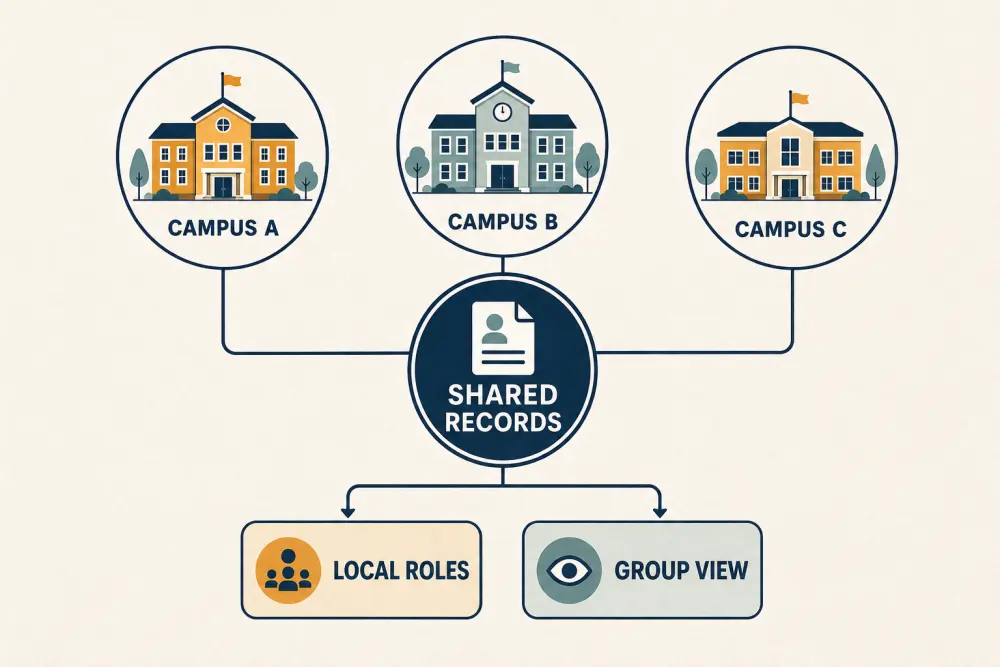
The model separates two needs. Campus teams manage authorised day-to-day work in their scope. Group leaders see comparable, appropriately aggregated information. Shared records connect them without making all data visible to everyone.
Decide what is truly common
Create common definitions for campus, academic period, grade or programme, subject, student status, staff status, fee category, assessment cycle, and reporting cut-off. Document the meaning and owner of each field.
Allow controlled local values where the operating model requires them. Campuses may have different calendars, languages, transport structures, fee plans, or programmes. A central standard should make comparison possible without erasing legitimate differences.
Version important structures. A policy or curriculum change should have an effective date and should not silently rewrite historical records.
Give every record a home and owner
Define which workflow is authoritative for identity, enrolment, guardians, classes, staff employment, fee transactions, attendance, assessment results, transport assignment, and communication groups. Other modules may read the relevant data but should not create competing master copies.
Assign data owners at group and campus levels. The central team may own common structure while a campus registrar owns local student corrections. Publish an escalation path for disputed or duplicate records.
Scope access by responsibility and campus
A campus teacher may need assigned classes only. A campus accountant may need local fee operations. A regional leader may need aggregate comparisons and specific drill-down under approved circumstances. Central system administrators should remain few and auditable.
Permissions must cover both action and scope. “View attendance” is incomplete unless the system also knows which campus, programme, class, period, and students are permitted.
Review transfers carefully. When a student or employee moves campuses, end the old scope and activate the new one at the correct time. Do not lose history or leave unnecessary access behind. The role-based access guide provides a fuller checklist.
Manage cross-campus processes explicitly
Some workflows span campuses: admissions allocation, student transfer, staff substitution, shared transport, central purchasing, common examinations, and group announcements. Define the initiating role, receiving role, approvals, effective date, and communication responsibility.
A transfer should not be implemented by creating a second active student. A shared employee should not be copied into unrelated personnel records. Use relationships and dated assignments where possible.
Make consolidated reports comparable
Before showing campus rankings, verify data completeness, timing, denominators, and local context. A fee collection rate can differ because calendars or concessions differ. Attendance can differ because campuses apply status rules inconsistently. Assessment results may not be comparable if papers or cohorts differ.
Show freshness and missing submissions. Allow drill-down to the responsible workflow and owner. Use group views to ask better questions, not to make automatic judgements.
The principal’s daily dashboard is suitable for local action; group leaders usually need a different weekly or monthly rhythm.
Standardise communication without silencing campuses
Maintain approved templates, branding, emergency patterns, and audience rules centrally where useful. Let campuses issue authorised local messages to current students, guardians, or staff. Group-wide messages should have explicit approval and preview of the affected audience.
Recipients should not receive duplicates simply because they are connected to more than one campus or child. Preserve the source and version of each communication.
Migrate in waves
Choose a representative campus, not only the simplest one. Clean core records, map local values to shared definitions, configure roles, test transfers and reporting, and reconcile against trusted totals. Capture exceptions as design input before onboarding the next campus.
Avoid a permanent “temporary” integration where campuses keep editing legacy spreadsheets after launch. Define the cut-over, fallback, reconciliation, and retirement plan.
Govern change after launch
Create a cross-campus governance group with clear decision rights. Review requests for new fields, statuses, roles, reports, and integrations. Prefer changes that solve a recurring organisational need, and prevent each campus from recreating the same concept under a different name.
Track data-quality exceptions, access reviews, unresolved transfers, integration failures, reporting timeliness, and adoption of authoritative workflows.
Multi-campus checklist
- Define shared terms, owners, and effective dates.
- Preserve necessary campus-specific configuration.
- Identify one authoritative home for each core record.
- Scope permissions by action, campus, and responsibility.
- Model transfers and shared assignments without duplicates.
- Check completeness and comparability before ranking campuses.
- Balance central communication rules with local ownership.
- Migrate campus by campus with reconciliation.
- Govern structural changes after launch.
Scholva’s connected academics, analytics, fees, and portals can be evaluated against a group’s governance model. Request a demonstration using a real cross-campus workflow.
Related reading: Choosing school ERP software in India and Migrating from registers and Excel.