
A school timetable is a compact model of the institution. It must fit curriculum requirements, teacher availability, rooms, practical periods, breaks, assemblies, and local policies into a finite week. A timetable can have no obvious double booking and still be difficult to teach or learn from.
The best process separates accurate inputs, explicit rules, conflict validation, and human review.
Collect the constraints first
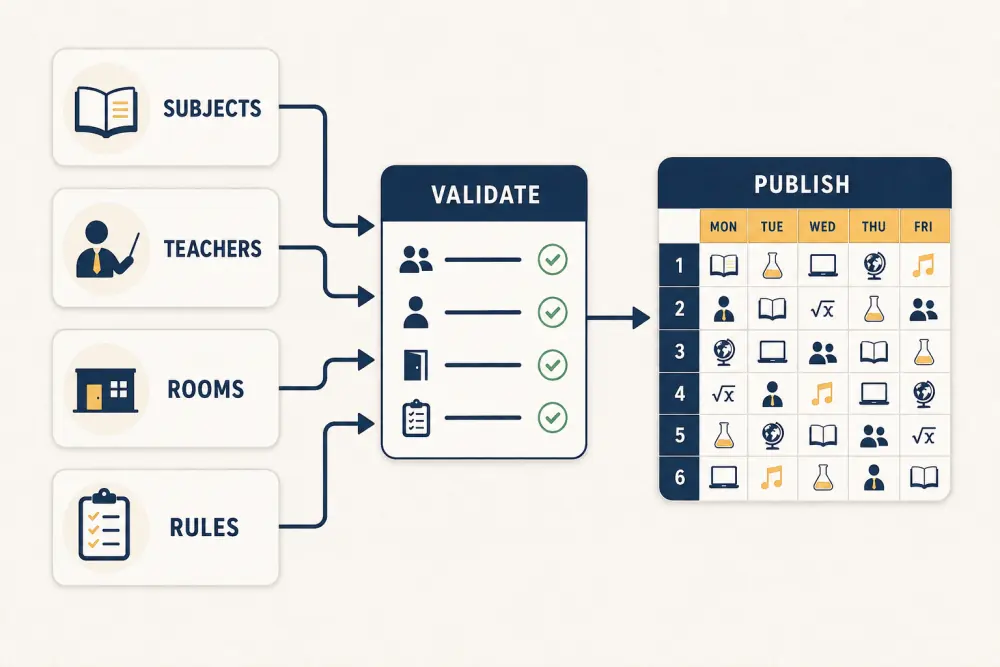
Begin with four dependable data sets:
- Subjects: required periods per week, preferred period length, practical or combined sessions, and class groups.
- Teachers: subject capability, assigned load, availability, part-time constraints, and non-teaching duties.
- Rooms: capacity, specialist equipment, accessibility, and periods when the space is unavailable.
- Rules: school hours, breaks, maximum consecutive lessons, subject spacing, and institutional priorities.
Confirm who owns each input. Timetable work slows down when the coordinator must repeatedly ask whether a teacher assignment or room restriction is current.
Distinguish hard and soft constraints
Hard constraints cannot be violated: one teacher cannot teach two classes at the same time; one room cannot host two groups; a laboratory practical needs an appropriate room; a part-time teacher cannot be scheduled outside availability.
Soft constraints improve quality but may require trade-offs: avoid placing every mathematics period last, distribute demanding subjects, reduce long teacher gaps, or keep a class in the same room where practical.
Label rules accordingly. If every preference is treated as mandatory, the schedule may become impossible. If every rule is flexible, the software can create a technically complete but educationally poor week.
Create the timetable in layers
Place the least flexible sessions first: shared teachers, laboratories, combined electives, specialist spaces, and fixed activities. Then schedule core subjects and finally more flexible periods. This reduces the need to dismantle large parts of the timetable when a scarce resource conflicts.
Use academic management software to maintain relationships between teachers, subjects, classes, and periods, but keep the scheduling rationale understandable to the coordinator. Automation should propose or validate; authorised staff should decide trade-offs.
Run multiple conflict checks
Validate more than double bookings. Check weekly subject counts, teacher workload, room suitability, class gaps, consecutive-period rules, practical durations, and unassigned periods. Review travel time if teachers or students move between buildings or campuses.
Then inspect distribution. A class receiving all language lessons on two days may meet the weekly count but lose useful learning rhythm. A teacher with repeated first-to-last-day gaps may face an unreasonable workload.
Test the timetable with people
Share a draft with department heads and a small teacher group. Give reviewers specific questions rather than asking whether it “looks fine.” Are specialist rooms correct? Are practical sequences realistic? Are support needs and accommodations accounted for? Are duty periods compatible with teaching?
Record requested changes and their effects. Moving one lesson can create a new conflict elsewhere, so every revision should return through validation.
Publish one authoritative version
Choose a publication time and version. Teachers, students, and parents should know where the current timetable lives. Avoid circulating independent spreadsheet and image copies that continue to be used after an update.
For mid-term changes, record the effective date, reason, approval, and affected audience. Use the school’s official communication channel for important changes and make sure connected daily views use the same version.
Plan for substitutions and exceptions
The master timetable is not the same as daily operations. Define how absence, substitution, room closure, an event, or an examination affects the day. A temporary change should not silently overwrite the long-term timetable.
Give authorised coordinators an exception workflow that shows the missing resource, possible alternatives, and people who need notification.
Timetable quality checklist
- Subject and period requirements are approved.
- Teacher availability and workload are current.
- Specialist rooms and fixed activities are placed first.
- Hard and soft constraints are explicitly separated.
- Double bookings, totals, gaps, and distribution are validated.
- Department heads review a controlled draft.
- Revisions are checked again before publication.
- One authoritative version reaches every role.
- Temporary substitutions preserve the master schedule.
- Recurring conflicts inform the next planning cycle.
A strong timetable is not merely conflict-free; it is teachable, explainable, and resilient when the day changes. Scholva can connect the timetable to academic records, staff assignments, and role-specific views. Request a demonstration with a sample week from your school.
Related reading: Manage the complete school examination cycle, a principal’s daily school dashboard, and connecting school HR, leave, payroll inputs, and substitutions.