
Many schools digitise the application form but leave the rest of admissions unchanged. Families submit information online, yet staff copy it into a spreadsheet, recreate it after approval, and enter it again for fees, class allocation, and parent accounts. The form is digital; the workflow is still fragmented.
A better admissions process treats each application as the beginning of a trusted student record.
Map the record from enquiry to enrolment
Start by listing every point where applicant information is created or changed. This may include an enquiry desk, website form, document review, interaction or assessment, approval, fee setup, and class placement.
Agree which fields are essential at each stage. An enquiry may need only a learner’s name, intended grade, guardian contact, and source. Identity documents, addresses, previous-school details, and fee information can be collected later. Asking for everything immediately makes forms harder to complete and gives staff more unverified data to manage.
Use one controlled flow
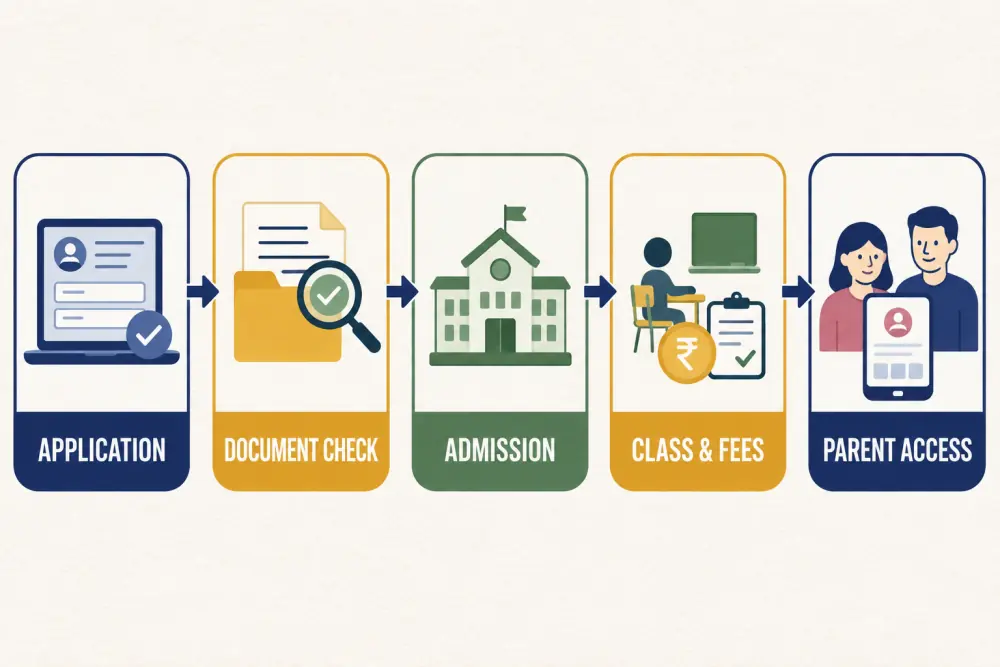
A connected flow has clear state changes:
- The family submits an application.
- Staff check required information and documents.
- An authorised person records the admission decision.
- The accepted record receives a student identifier, class placement, and fee plan.
- The school enables parent or student access using the verified contacts already held.
Each stage should have an owner and a visible status. Avoid using free-text notes as the only way to show whether an application is incomplete, under review, accepted, waitlisted, or declined.
Decide which data becomes authoritative
Duplicate entry often begins because departments do not trust one another’s records. Define the source of truth for key information. Admissions may own the initial legal name and guardian details; academics may own class and section; finance may own concessions and payment status.
When another team needs a correction, the system should route it to the responsible role or record an authorised change. Quietly maintaining separate copies creates mismatched spellings, outdated phone numbers, and confusing reports.
Build verification into the process
Digital does not automatically mean accurate. Use validation for dates, phone numbers, email addresses, required fields, and grade choices. Document review should record what was checked, by whom, and when. Sensitive documents should only be visible to roles that genuinely need them.
Plan for exceptions such as guardians with different addresses, students joining mid-year, transfers between campuses, missing documents with an approved deadline, and applications for siblings. These cases should remain part of the workflow rather than moving into private spreadsheets.
Connect admission to the first school day
The most valuable handoff happens after acceptance. A confirmed applicant should be available for academic setup, the correct fee structure, and controlled parent access without being manually recreated.
That does not mean every module must activate instantly. It means downstream teams use the same verified identity and can complete their part when ready. This continuity also makes later reporting more dependable because the admission source, student record, and current status remain connected.
Prepare the team before launch
Run a pilot with a small intake or one grade. Give staff a checklist for common actions: finding an existing enquiry, requesting a missing document, correcting a contact number, recording a decision, and converting an accepted applicant.
Before the full admission season, test peak conditions. Can two staff members safely review different records? Can leaders see overdue follow-ups? Can the office export a list for an approved operational need? Can a duplicate application be identified without deleting history?
Measure whether the workflow improved
Track practical measures rather than the number of forms submitted online. Useful indicators include the percentage of applications with complete documents, time from submission to first response, number of duplicate records, accepted students awaiting class or fee setup, and routine status calls from families.
A weekly exception review is often more helpful than a large dashboard. Focus on applications that are stuck, inconsistent, or missing an owner.
Admission digitisation checklist
- Define stages, statuses, owners, and approval rights.
- Collect only the data needed at each stage.
- Validate important fields and document checks.
- Search for an existing enquiry before creating a new record.
- Convert accepted applicants instead of retyping them.
- Connect class, fee, and portal setup to the verified record.
- Restrict sensitive information by role.
- Pilot before the busiest admission period.
- Review exceptions and duplicate rates every week.
Digitising admissions should remove handoffs, not just paper. Scholva can connect the applicant journey to everyday school operations while preserving clear ownership. To see the flow with your institution’s stages, request a demonstration.
Related reading: The complete guide to choosing school ERP software in India and Design flexible school fee structures.
For a related perspective, see The Admissions Enquiry Funnel: Where Prospective Families Actually Drop Off.