
Teachers do not gain time simply because a paper form becomes a digital form. Time is recovered when one accurate action supports the next step and teachers no longer repeat the same update across registers, spreadsheets, portals, and messages.
Connected software should make the teaching day calmer while preserving professional judgement.
Design for one useful entry
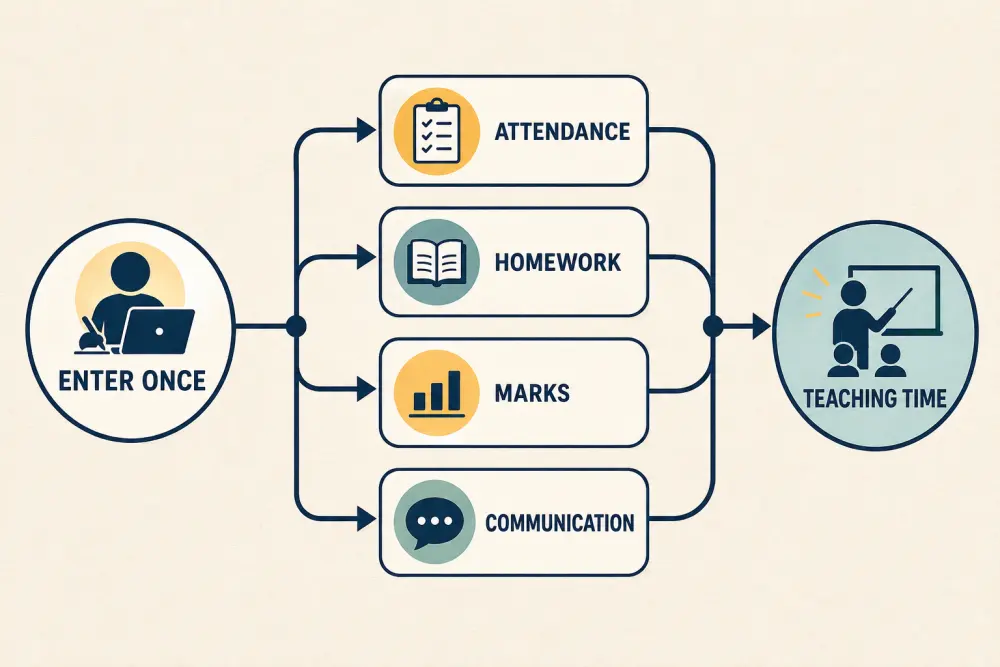
“Enter once” does not mean every detail is reused everywhere. It means an authorised, relevant update - such as attendance for the scheduled class - becomes available to the workflows that legitimately need it. Role, purpose, and privacy still apply.
Start with the timetable and roster
A teacher’s day view should show the correct classes, rooms, students, substitutions, and duties. If the underlying timetable or enrolment is wrong, every downstream task becomes harder.
Give authorised teams clear ways to correct a roster or substitution. Preserve the effective date so yesterday’s attendance is not rewritten when a student changes section today.
The conflict-free timetable guide explains how constraints and approved changes create a reliable foundation.
Make attendance a short classroom task
Open the scheduled roster, record an outcome quickly, and distinguish absence from an unsubmitted register. Support late arrival, approved activity, corrections, and offline or temporary network failure according to the school’s process.
Once submitted, the appropriate office or pastoral workflow can handle follow-up. Teachers should not have to copy absent names into a separate message unless an exceptional note is required.
Connect homework to the class context
An assignment should inherit the relevant class, subject, teacher, and audience, while allowing the teacher to adjust instructions, resources, dates, and accommodations. Reusable structures can reduce setup without forcing every lesson into the same template.
Students and guardians should see the current version and a clear change notice. Avoid making teachers announce the same correction through several channels.
Submission and review queues should show what needs attention. A teacher needs meaningful exceptions, not repeated notifications for routine completion.
Keep marks inside the assessment cycle
When the assessment structure, eligible students, maximum marks, and publication rule are already approved, teachers can focus on entry or grading. Validation should catch impossible or missing values before submission, and moderation should occur in the defined workflow.
Teachers should not rebuild report-card spreadsheets from raw marks. Approved results can flow to reports and portals after the correct checks. See how to generate report cards without spreadsheet errors.
Online assessment can reduce routine marking for suitable question types, but it does not remove the need for good questions and teacher review. Our online assessment guide sets out that boundary.
Make communication a consequence of the workflow
Useful messages often follow a recorded event: an attendance follow-up, changed class, published assignment, approved result, or parent-meeting action. Templates can provide structure, but staff should see the audience and content before sending high-impact communication.
Keep a record of what was sent and which version it referenced. This reduces repeated explanations and helps colleagues answer a family consistently.
Build a focused teacher home view
Prioritise today’s classes, registers awaiting submission, upcoming lessons, homework review, marks deadlines, duties, and conversations needing response. Separate informational notices from required actions.
Do not turn the home view into a performance scoreboard. Activity counts without context can reward unnecessary clicks and encourage rushed work.
Protect judgement and boundaries
Automation is useful for pre-filling context, validating data, routing approved events, and reminding owners. It should not write sensitive pastoral notes, decide a student’s support, publish marks, or contact a family without the institution’s chosen safeguards.
Teachers also need notification boundaries. Bundle low-priority updates, respect working-time policies, and avoid duplicate alerts across email, app, and chat.
Measure saved work honestly
Observe representative teachers before and after rollout. Count duplicate entry, steps per common task, correction loops, time to find current information, and work completed outside expected hours. Pair measurements with teacher interviews.
A faster screen that causes more downstream corrections is not an improvement. Monitor data quality and staff support demand alongside task time.
Teacher-workflow checklist
- Make timetable and roster data trustworthy.
- Optimise frequent tasks for few, clear actions.
- Reuse only relevant data with role-based controls.
- Route follow-up without duplicate lists or messages.
- Validate marks before approval and publication.
- Separate today’s actions from general information.
- Preserve teacher judgement for sensitive decisions.
- Respect notification and accessibility needs.
- Measure duplicate work, corrections, and lived workload.
Scholva’s academics, assessments, and communication workflows can be reviewed through a teacher-day scenario. Request a demonstration to test the common tasks that consume time in your institution.
Related reading: A complete examination-cycle workflow and A complete workflow for coaching institutes.
For a related perspective, see The Coordination Dividend: How Integrated School Operations Create More Time for Education.