
Coaching institutes operate on a fast cycle. Enquiries become enrolments, students join batches, schedules change, attendance is recorded, instalments become due, tests produce results, and families expect timely updates. When every stage has a separate spreadsheet or chat group, staff spend their day reconciling versions.
A complete workflow connects these events while keeping academic and financial responsibilities clear.
Connect the operating loop
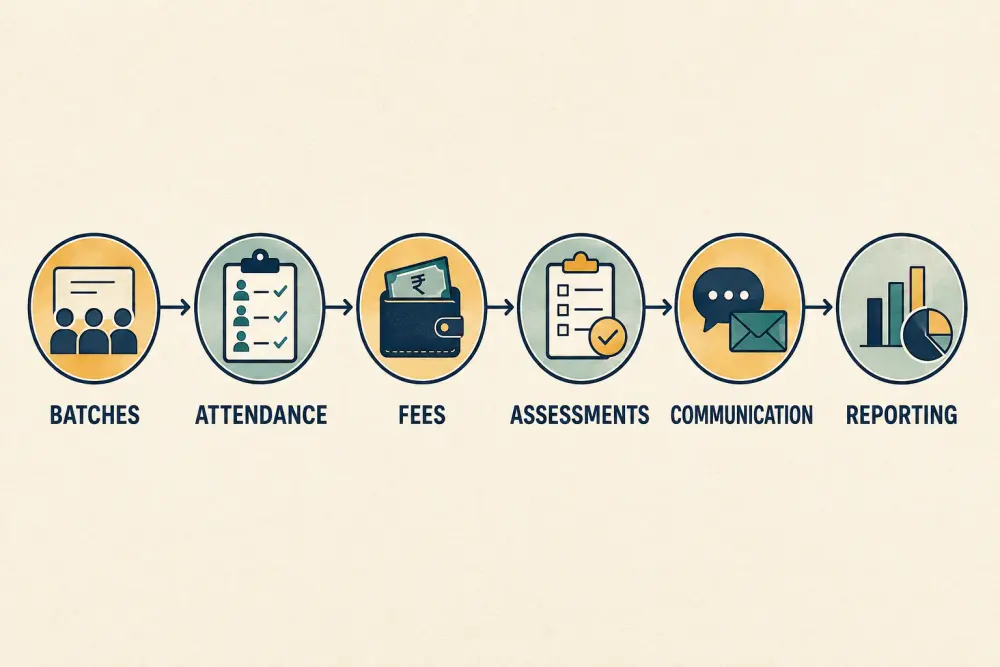
The six stages do not need to be owned by one person, but they should use the same student, course, batch, and academic-period definitions. When a student changes batch, authorised staff should see the effect on schedules and attendance without rebuilding the record everywhere.
Structure courses and batches deliberately
Define the course, subject combination, delivery mode, duration, academic period, capacity, location, timetable, and faculty assignment. Treat the batch as an operational grouping, not the student’s permanent identity.
Set a reviewed process for transfers, merged batches, extra sessions, cancellations, and substitutions. Preserve history so reports can explain which batch a student attended at a given time.
Avoid creating new batch names to solve every exception. Too many near-duplicates make scheduling, communication, and reporting unreliable.
Turn admission into an active student record
Capture an enquiry once, follow it through counselling and application, and convert accepted information into the student profile after review. Separate optional lead notes from the official academic record. Confirm guardian relationships, contact preferences, selected course, fee plan, start date, and required documents.
Do not ask staff to type the same name and phone number again at the batch, fee, attendance, and test stages. The principles in our admissions digitisation guide apply equally to coaching operations.
Make attendance actionable
Give faculty a quick roster for the scheduled session. Record present, absent, late, excused, and cancelled-class outcomes according to policy. A missing entry is not the same as absence.
Define when a guardian or adult learner receives an alert and who reviews repeated absence. Make corrections auditable. Attendance patterns may prompt a conversation, but they should not automatically label motivation or predict performance.
Link fees without exposing finance widely
Assign the approved fee plan, instalments, concessions, payments, refunds, and receipts to the same learner and course record. Faculty may need a limited operational indicator in some institutes, but they rarely need full financial history.
Use role-based access and approval for concessions or write-offs. Reconcile digital payments before marking them final, and keep an exception queue for unmatched transactions. Our guide to flexible school fee structures explains the underlying design choices.
Run assessments as a cycle
Define the syllabus coverage, test date, eligible batches, marking method, publication rule, and recheck process. Results should feed useful student and batch views without forcing teachers to rebuild spreadsheets for every test.
Topic-level information can guide revision sessions when the question design supports it. It should not be used as a diagnosis without teacher review. See topic-level assessment analytics for a cautious workflow.
Communicate from current records
Send schedule changes, attendance notices, payment reminders, test updates, and centre announcements to the correct audience. Use targeted groups derived from current batch and guardian relationships, with an approval route for high-impact messages.
Avoid treating an informal chat group as the authoritative timetable. The system of record should show the current version and its effective time, while messages direct people back to it.
Give each role the right report
Faculty need today’s batches, attendance gaps, teaching plans, and assessment work. Front-office staff need enquiries, documents, transfers, and family requests. Finance needs dues, reconciliation exceptions, and approved adjustments. Leaders need capacity, attendance, collection, assessment, and service trends with drill-down to source records.
Do not create one giant dashboard for everyone. Role-appropriate views reduce noise and unnecessary access.
Roll out in one centre first
Map the current process, choose one course or centre, clean active student and fee records, configure roles, and run parallel checks for a short period. Reconcile attendance, dues, and results before retiring old registers. Train staff on exceptions, not only the happy path.
Coaching workflow checklist
- Use common student, course, batch, and academic-period definitions.
- Define transfers, extra classes, substitutions, and cancellations.
- Convert admissions data after review rather than re-entering it.
- Connect session attendance to appropriate follow-up.
- Protect fee information with scoped roles and approvals.
- Link tests to syllabus coverage and publication rules.
- Send targeted updates from current records.
- Give each role a focused work queue and report.
- Pilot, reconcile, and document exception handling.
Scholva’s connected academics, fees, assessments, and communication workflows can be evaluated against this operating model. Request a demonstration using one of your real batch cycles.
Related reading: The business case for school management software and How connected software gives teachers more time.
For a related perspective, see One ERP Across a Multi-Campus University: What Actually Has to Be Shared.