
A request for “a new school ERP” is difficult for a management committee to evaluate. It sounds like a large technology cost without showing which operational problems will change, what adoption requires, or how the institution will know the investment worked.
A credible business case connects a small set of important workflows to evidence, options, full cost, risk, and measurable outcomes.
Build the case in six parts
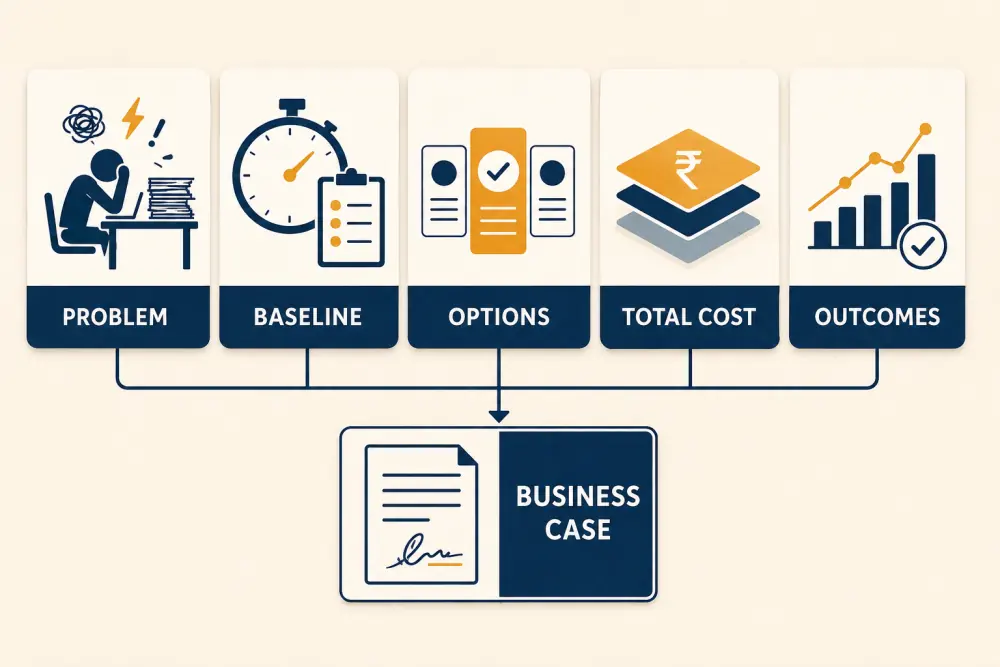
- Problem: describe current operational friction and whom it affects.
- Baseline: measure the present process before proposing improvement.
- Options: compare realistic alternatives, including improving the current approach.
- Total cost: include implementation, migration, training, support, and internal time.
- Outcomes: define observable changes rather than assumed savings.
- Business case: recommend a phased decision with owners and review points.
Describe problems as workflows
“Administration is inefficient” is too broad. A stronger statement might explain that admission data is entered in three places, finance staff spend time matching unidentified payments, or teachers recreate the same attendance information for parent messages.
Map each workflow, handoff, delay, error, and affected role. Include the cost of doing nothing: staff time, slow family response, unreliable reporting, missed follow-up, or growth that the current process cannot support.
Establish a baseline
Collect several weeks of representative evidence where possible. Measure steps and time per cycle, duplicate entry, exception volume, parent enquiries, report preparation time, and corrections. Use ranges when activity varies across admission, examination, or fee seasons.
Do not convert every minute into a guaranteed cash saving. Time released from repetitive work may improve service, accuracy, capacity, or staff wellbeing without reducing payroll.
Compare options fairly
Options may include standardising the current process, adding a focused tool, integrating existing systems, adopting a connected platform, or phasing modules over time. Compare each against the same criteria: workflow fit, usability, data control, implementation effort, support, scalability, and cost.
Use real scenarios during demonstrations. The school ERP buyer guide provides a fuller evaluation framework.
Calculate total cost
Include subscriptions or licences, setup, data cleaning, migration, integrations, devices, connectivity, messaging, training, internal project time, support, custom work, and future growth. Clarify which costs are one-time, recurring, usage-based, or uncertain.
Compare costs over a reasonable decision horizon and document assumptions. A lower first-year quote can become more expensive if essential workflows require extensive manual work or later customisation.
Define outcomes the school can observe
Choose measures linked to the priority workflows: fewer duplicate student records, shorter time to reconcile fee payments, more complete attendance by a defined time, fewer routine status calls, faster report preparation, or fewer post-publication corrections.
Set a baseline, desired direction, owner, and review date. Avoid promising fixed percentage improvements without evidence from your institution.
Address risk and change
Cover data security, access, migration quality, vendor dependency, service continuity, adoption, and workload during implementation. Explain mitigations: role-based controls, tested exports, staged migration, pilot groups, training, and rollback plans.
Include staff and parent experience. A system that technically works but is difficult to adopt will not produce the expected outcomes.
Recommend a phased decision
Propose an initial scope around two or three connected workflows, named owners, preparation activities, and a review after the first operational cycle. For example, a school might start with student records and academic operations, then connect fees and parent access.
State which later phases depend on the first phase succeeding. This gives the committee control without forcing a large one-time launch.
Business-case checklist
- Priority problems are described as specific workflows.
- Baseline evidence covers normal and peak periods.
- Realistic alternatives use the same comparison criteria.
- Total cost includes internal work and future scaling.
- Benefits are observable, owned, and time-bound.
- Assumptions are visible and sensitivity is discussed.
- Security, migration, adoption, and continuity risks have mitigations.
- The proposal includes a pilot or phased scope.
- Review points allow the institution to adjust.
- Claims avoid unsupported guaranteed savings.
The strongest case is not “buy software because other schools do.” It is “improve these workflows, for these people, with these controls, and review these outcomes.” To evaluate Scholva against your own scenarios, request a guided demonstration.
Related reading: School ERP migration checklist and How connected software gives teachers more time. For a related walkthrough of practical Scholva workflows from first week to everyday value, see this article.